You make something once, and it keeps selling while you sleep. A template, a printable or a short guide can sell 100 times with no stock to store and nothing to ship. The catch: fees take 5% to 30% of each sale, and nobody buys a product they cannot find.
Pick one problem you can solve, build one small product that solves it, price it for the hours it saves the buyer, and put it where buyers already look. Here is how, with the fee maths worked out on a $15 sale.
The short answer
Selling digital products is a real way to earn side income, but it is a slow build, not quick cash. You create a file once, a template, printable, guide or preset, and sell copies of it online. On a $15 sale you keep about $13.12 on Etsy, $12.26 through a Gumroad direct link, $10.50 on Gumroad Discover, and $14.26 on your own store before its monthly cost.
The quick framework:
- Pick one problem you can solve well.
- Build one small product that solves it.
- Price it for the hours it saves the buyer.
- Choose where to sell it: a marketplace or your own store.
- Launch it, listen to buyers, and improve it.
Quick decision guide:
- No audience yet? Start on a marketplace: it brings buyers, and you pay for that in fees.
- Already have followers? Sell from your own store or a hosted checkout and keep more per sale.
- Only one product and little time? A hosted checkout link is the fastest way to start.
- Want a shop with many products? A marketplace storefront brings search traffic from day one.
Step 1: Pick one problem you can solve
The products that sell answer a real need: a budget planner, a resume template, a meal plan, a wedding invitation. Pick a problem you know well.
Start narrow: one product for one kind of buyer.
- Best for: skills you already use every week, like budgeting, planning, design or writing.
- Not for: copying a bestseller you saw online. Buyers can tell.
Step 2: Build one small product
Keep the first product small. A one-page budget tracker, a five-page meal plan, a set of ten social media templates. A small product is faster to finish, easier to price, and easier to fix when buyers point out a problem.
Test it first. Give it to two or three people who match your buyer. If they get stuck on page one, fix that before you list it. A product that works first time earns reviews; one that confuses people earns refunds.
Step 3: Price it for the hours it saves
Buyers pay for the hours your product saves them, not for the file itself. A $12 planner that saves an hour a week is cheap. A $2 file that saves nothing is dear. Price the outcome, not the page count.
Most simple digital products sell for $5 to $25. A short template sits near the low end; a full kit with several files can sit higher. If you have never sold before, start near the middle of the range.
But the price on the listing is not what you keep. Fees come off every sale, and they vary a lot by where you sell.
Step 4: Choose where to sell it
Three main routes. A marketplace like Etsy puts your product in front of people already shopping, and charges for that. A hosted checkout like Gumroad gives you a simple link to share with your own audience. Your own store keeps the most per sale, but you bring every buyer yourself.
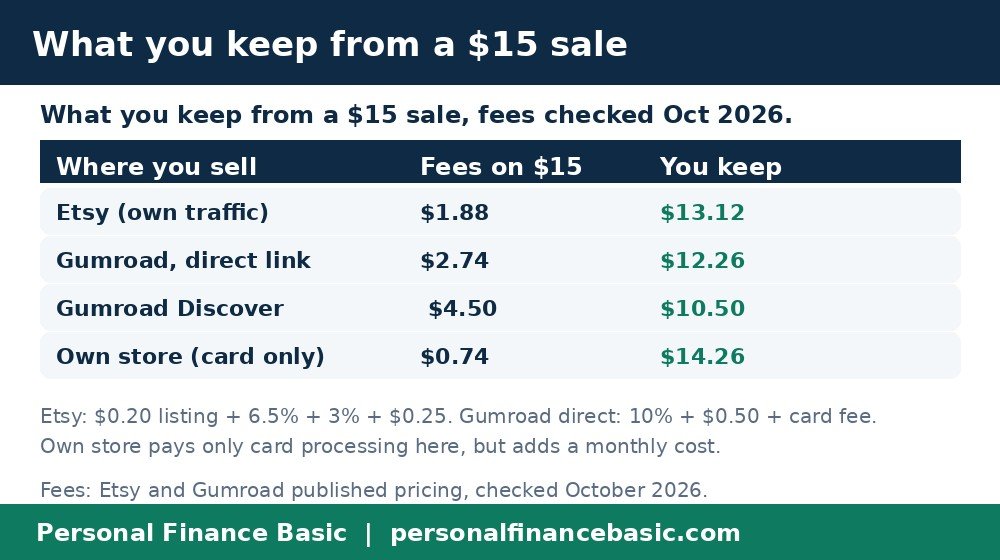
What you keep from a $15 sale depends on where you sell it. Fees checked October 2026.
| Where you sell | Fee on a $15 sale | You keep | Who brings buyers |
|---|---|---|---|
| Marketplace (Etsy) | $1.88 | $13.12 | The marketplace |
| Hosted checkout, direct link (Gumroad) | $2.74 | $12.26 | You |
| Hosted checkout, marketplace search (Gumroad Discover) | $4.50 | $10.50 | The platform |
| Your own store (card fee only) | $0.74 | $14.26 | You, plus a monthly cost |
Fees from Etsy and Gumroad published pricing, checked October 2026. Your own store also has a monthly cost, not shown here.
- Best for a marketplace: a first product with no audience; search traffic does the finding.
- Best for a hosted checkout: creators with followers or a newsletter. One link, no store to build.
- Best for your own store: several products and steady traffic; the monthly cost only pays off once sales are regular.
Step 5: Launch it, then improve it
Launch with one product and one listing. Write it the way a buyer searches: what it is, who it is for, what it does. “Budget planner for new parents” beats “my planner v2”. Show a clear preview of the inside pages.
Then watch what happens. If people view the listing but do not buy, the price or the preview is the problem. If nobody views it at all, the title and tags are the problem. Fix one thing at a time and give each change a week or two.
Take Maya as a worked example. She sells a $15 budget planner template, 100 copies in her first year, which is $1,500 in sales. On Etsy, fees of $1.88 a sale leave her with $1,312. Through a Gumroad direct link, fees of $2.74 leave her with $1,226. The $86 difference is the price of the buyers the marketplace found for her. Neither number is a promise: 100 sales takes real traffic, and most new sellers start far slower.
What about tax?
Digital sales are taxable income in the United States. The platform will usually report your sales to the IRS, and you owe tax on the profit whether or not you get a form. Set aside part of each payout for tax, and keep records from the first sale.
At a glance
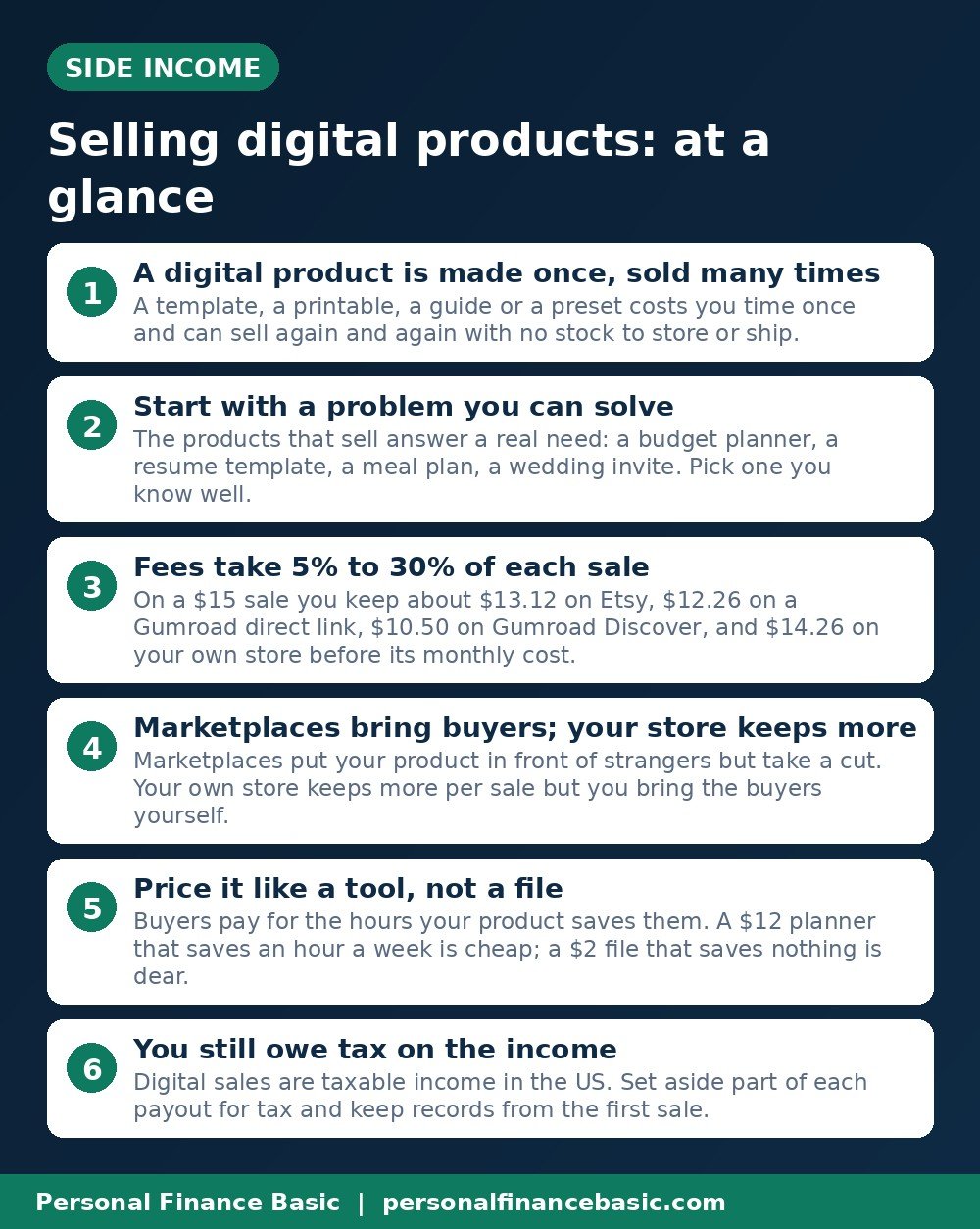
The main points from this guide, in one picture.
Frequently asked questions
Do I need a business license to sell digital products?
Usually not to start. Most sellers begin as individuals and report the income on their tax return. Rules vary by state and city.
How much money can I make selling digital products?
There is no typical number. A single $15 product needs about 67 sales to reach $1,000 in gross sales, and most new sellers take months to get there. Steady earners usually have several products and a way for buyers to find them.
Can I sell the same product on more than one platform?
Yes, in most cases, as long as it is your own work. Many sellers list the same file on a marketplace and on their own store. Keep the price the same in both places.
What sells best for beginners?
Simple tools people use every week: planners, trackers, templates and checklists. A budget planner or a meal plan is easier to finish than a long course, and buyers know at once what they are getting.
What if someone shares my product for free?
It happens, and there is no perfect fix. Add a license note saying the file is for personal use, and ask a site to remove a copy of your work. Most sellers find the lost sales are small next to the sales from buyers who pay.
The bottom line: a digital product is a small file that solves one real problem, priced for the hours it saves, sold where its buyers already look. Build one and start where the buyers are.
This post is general education, not financial or tax advice. Platform fees are from Etsy and Gumroad published pricing, checked October 2026, and they change. Check the pricing page before you choose where to sell.
Related reading: Best Ecommerce Platforms in the USA for Beginners (2026) and 10 Side Hustles You Can Start With No Money in the US