Payday comes, the money lands in your checking account, and by the third week you are doing mental math about whether the electric bill will clear. The problem is not your budget. It is that one account is doing two jobs, and the spending job keeps eating the bills job.
The two-account system fixes that with a wall. One account pays the bills, and a second holds the spending money. When the spending account is empty, spending stops, and the bills are already safe.
Here is how to set it up in one payday, with real numbers.
The short answer
Open a second checking account. Every payday, all of your pay goes into the bills account, and you move one fixed amount into the spending account. Bills auto-pay from the bills account, and everything flexible comes from the spending account. The spending balance is your budget.
The quick framework:
- Open a second checking account, the spending account.
- List your fixed bills and add them up.
- Set the spending transfer: pay minus bills, minus a small buffer.
- Move the bills to auto-pay from the bills account.
- Live from the spending account, and stop when it is empty.
Quick decision guide:
- Bills keep bouncing or getting paid late? The bills account fixes that first.
- Money leaks away with no big purchase to show for it? The spending account makes the leak visible.
- Paid biweekly and months feel uneven? Set the transfer per paycheck, not per month.
- Already on 50/30/20 or zero-based budgeting? The two accounts enforce the plan, they do not replace it.
Step 1: Open the second account
You need two checking accounts at the same bank, or at two banks. Most banks let you open a second one online in a few minutes, often with no monthly fee if you keep a minimum balance or set up direct deposit. Ask before you open it: is there a monthly fee, and what waives it?
Name them “Bills” and “Spending” in the app. Keep the debit card for the spending account in your wallet, and leave the bills account card at home, so a quick purchase never pulls from bill money.
- Best for: a second checking account with no monthly fee, named clearly in the app.
- Not for: using a savings account as the spending account; withdrawal limits and transfer delays get in the way.
Step 2: Add up the bills, then set the transfer
List every fixed bill: rent, utilities, car payment, insurance, phone, internet, subscriptions, and minimum debt payments. Add them up, and that total is what the bills account must hold.
Here is the split on a $3,000 take-home paycheck:
| Account | Monthly amount | Pays for |
|---|---|---|
| Bills account | $1,950 | Rent, utilities, car, insurance, phone, minimums |
| Spending account | $1,050 | Groceries, gas, eating out, fun, clothes |
Example split on a $3,000 example paycheck. Your numbers will differ; the method is the same.
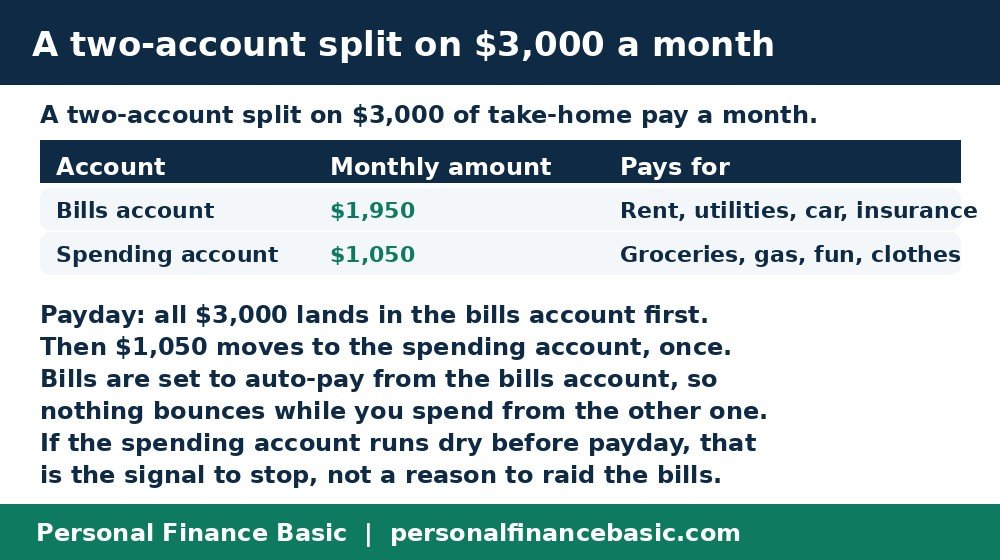
A two-account split on $3,000 a month.
Keep a $200 to $300 buffer in the bills account for a bill that lands early or a utility that runs high in winter. That buffer is bills money, not spending money, and you top it back up next payday.
If you are paid biweekly, work out the transfer per paycheck. A $3,000 monthly example is $1,500 per paycheck, so the spending transfer is $525 per paycheck. Two paychecks cover a full month of bills, and the buffer covers the gap in short months.
Step 3: Move the bills to auto-pay
Once the accounts are open, switch each fixed bill to auto-pay from the bills account: rent, utilities, car payment, insurance, phone. Do it one bill at a time, and check the first payment of each one.
Time the transfer for payday morning, or set it as an automatic transfer the day after payday. Automatic is better: the system should run without you remembering it. A manual transfer gets skipped in a busy week.
Keep one rule: nothing flexible ever comes out of the bills account. No groceries, no eating out, no “just this once” purchases. The moment a flexible cost comes out of it, the wall is gone.
- Best for: auto-pay on every fixed bill, and an automatic transfer on payday.
- Not for: bills that change a lot month to month; those belong in the spending account, with a monthly average set aside.
Step 4: Live from the spending account
The spending account balance is now your budget: $1,050 a month on a $3,000 example paycheck, or about $262 a week. Check the balance before you shop, not after. When it hits zero, spending stops until the next payday.
That sounds strict, and it is meant to be. But it is honest: the money is gone because you spent it, not because a bill took it first. An empty spending account means you spent $1,050 on groceries, gas and fun this month. That is information, not failure.
If the spending account runs dry in the first week every month, the transfer is too small, not your willpower too weak. Raise the transfer by $100 and cut one flexible cost to match, instead of raiding the bills account.
Step 5: Review it once a month, in 30 minutes
At the end of the first month, look at three numbers: did every bill pay on time, did the spending account last to payday, and is the buffer still there?
If the spending account ran dry on day 24 of 30, you are close: the transfer needs a small raise, or one spending category needs a cap. If money is left on payday, move it to savings instead of rolling it into next month’s spending.
After two or three months, the system runs itself, and the monthly review shrinks to checking that the bills paid and the buffer is intact.
One warning: this system stops overspending, but it does not create savings by itself. To save, add a third move on payday: a fixed amount to savings, before the spending transfer. Even $100 a month is $1,200 a year.
At a glance
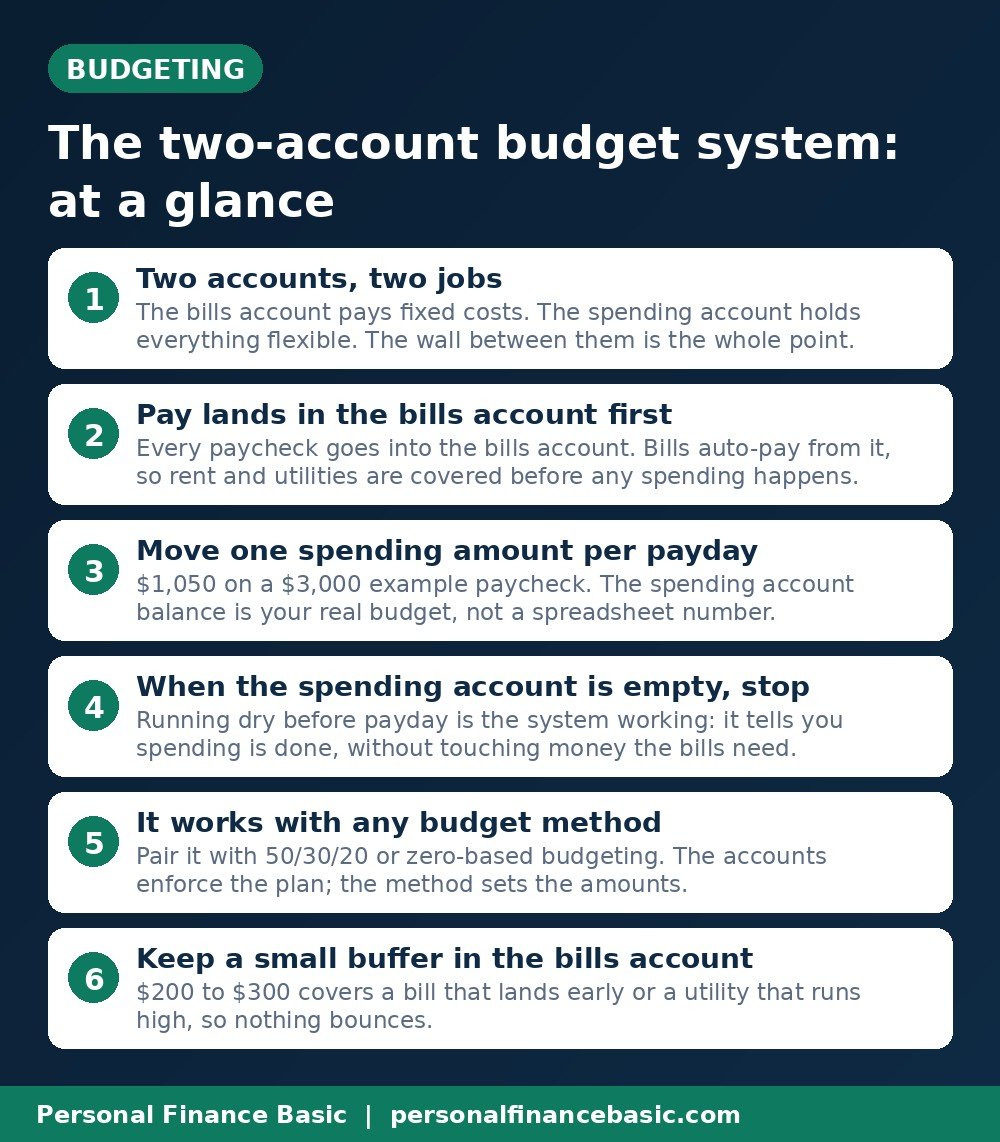
The main points from this guide, in one picture.
Frequently asked questions
Do I need a second bank account for this?
Yes, that is the whole system: one for bills, one for spending. Most banks let you open a second checking account online in minutes, often with no monthly fee.
How much should go in the spending account?
Your take-home pay minus your fixed bills, minus a $200 to $300 buffer in the bills account. On a $3,000 example paycheck with $1,950 of bills, that is $1,050 a month for spending.
What if I am paid biweekly?
Set the transfer per paycheck. On the $3,000 example, that is $525 per paycheck into the spending account. Two paychecks a month cover a full month of bills, and the buffer covers short months.
What if the spending account runs out before payday?
Stop spending until the next payday. That is the system working, not failing. If it happens every month, the transfer is too small: raise it and cut one flexible cost to match.
Does this replace a budget like 50/30/20?
No. It enforces whatever budget you use. 50/30/20 or zero-based budgeting sets the amounts; the two accounts make sure the money actually goes where the plan says.
The bottom line: one account for bills, one for spending, and a fixed transfer on payday. On a $3,000 paycheck that is $1,950 for bills and $1,050 to live on, and when the spending account is empty, spending stops while the bills stay safe.
This post is general education, not financial advice. Account fees and features vary by bank; check the terms before you open a second account.
Related reading: How to Budget on a Biweekly Paycheck and The 50/30/20 Rule With US Examples ($3,000 a Month)