Payday comes, the money lands, and by the end of the week most of it is gone. Not on anything big. On small things that never felt like spending at the time.
That is the normal pattern. The money you mean to save sits in the same account as the money you spend, and spending wins most months.
The fix is simple: move the money before you can spend it. A $100 automatic transfer from each biweekly paycheck adds up to $2,600 a year. Here is how to set it up once.
The short answer
Send a fixed amount out of your paycheck on payday, before it reaches your spending account. The easiest way is a split direct deposit; if your employer cannot split your pay, use a scheduled transfer instead.
The setup takes about 20 minutes:
- Pick an amount you will not miss, such as $50 or $100 per paycheck.
- Choose the route: split direct deposit, automatic transfer, or a 401(k) deduction.
- Set the date to payday, so the money moves the same day your pay lands.
- Send half of every raise to savings before your spending catches up.
- Check the amount every three months and adjust it as pay and bills change.
Quick decision guide:
- Paid by direct deposit and want it done for you? Split your deposit.
- Employer cannot split your pay? Set an automatic transfer for payday.
- Saving for retirement? Use a 401(k) payroll deduction.
- Income changes every month? Automate a small fixed amount and add extra in good months.
What $100 a paycheck adds up to
With biweekly pay you get 26 paychecks a year, so even a modest amount builds fast. Take Maya, who earns $3,200 a month after tax and is paid every two weeks. A $100 transfer on each payday is $2,600 a year, about 7 percent of her take-home pay. After a year she has a starter emergency fund. The figures are an example, not a promise: your total depends on your pay and how long you keep the transfer running.
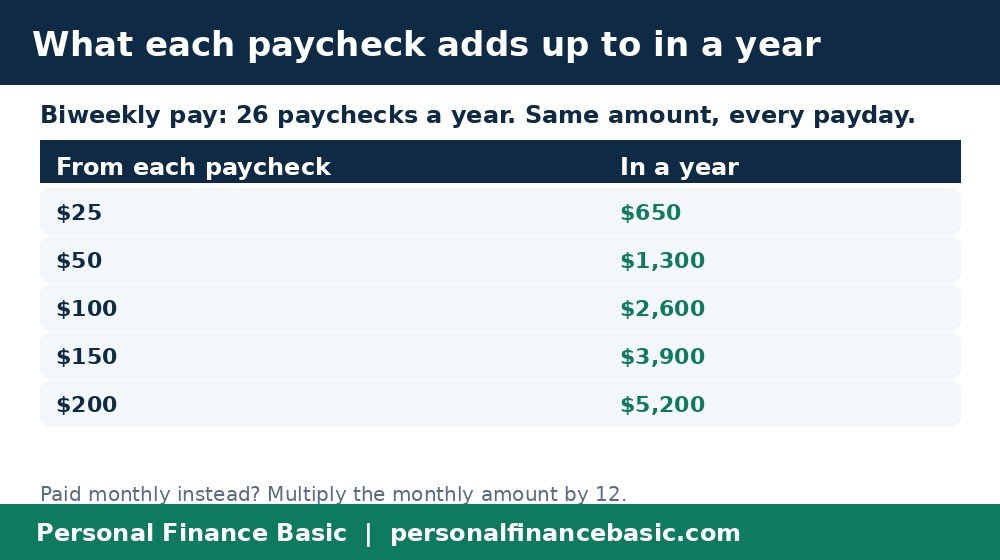
What a set amount from each paycheck adds up to.
Four ways to automate saving, compared
| Method | How it works | Best for |
|---|---|---|
| Split direct deposit | Part of each paycheck goes straight to savings | Anyone paid by direct deposit |
| Automatic transfer | Your bank moves money to savings on a schedule | Employers that cannot split pay |
| 401(k) deduction | Money comes out of your paycheck before tax | Retirement saving, especially with a match |
Split deposit and automatic transfers do the heavy lifting. Round-ups are fine as a bonus, but they save only a few dollars a week.
- Best for most people: split direct deposit. The money never touches your spending account.
- Best for retirement: a 401(k) deduction. It comes out before tax, and an employer match is extra money on top.
Step 1: Pick an amount you will not miss
Start smaller than you think. An amount that leaves you short will get cancelled, and a cancelled plan saves nothing.
A good first amount is $50 to $100 per paycheck, or about 5 percent of your take-home pay. If money is tight, start with $25. The habit matters more than the size: raise it in three months.
Step 2: Split your direct deposit
Ask your employer’s payroll team for a direct deposit form, or look in your company’s HR portal. Most employers let you split your pay between two accounts, usually by a dollar amount or a percentage.
Fill in your savings account and routing numbers, and the amount to send there each payday. The rest goes to checking as normal. Double-check the account number first: a wrong digit sends the money to the wrong place.
- Best for: anyone paid by direct deposit who wants saving to happen without thinking about it.
- Not for: people paid by paper check, or whose employer only allows one deposit account. Use Step 3 instead.
Step 3: Put a transfer on payday as backup
If your employer cannot split your deposit, set up a recurring transfer in your bank’s app. Schedule it for payday, so the money leaves checking before the week gets going.
Match the transfer date to your real payday. If your pay lands on Friday and the transfer runs on Monday, you get a weekend to spend the money first.
Step 4: Automate retirement too
Retirement saving works the same way, through payroll. If your job offers a 401(k), your contribution comes out of each paycheck before you see the money.
For 2027, the IRS set the 401(k) employee limit at $25,500 a year, up $1,000 from 2026. Most beginners do not need to think about the limit. What matters is the match: many employers add money when you contribute, and that match is part of your pay you only get by saving. An IRA works differently, because no employer takes the money out: set a monthly automatic transfer from checking instead. The IRA limit for 2027 is $7,500, unchanged from 2026.
Step 5: Send half of every raise to savings
Raises are the easiest money to save, because you never had it before. When your pay rises, send half the increase to savings and keep the other half for spending.
Take a $200-a-month raise: send $100 to savings and keep $100. Your spending still rises, but your savings rise too. Do the same with windfalls: send at least half of a tax refund or bonus to savings on the day it arrives.
Step 6: Check it every three months
Automation is not a one-time job. Put a five-minute check on your calendar every three months: is the transfer still running, and is the amount still right? Raise it after a pay rise or a paid-off debt. Lower it if money gets tight, but do not cancel it.
At a glance
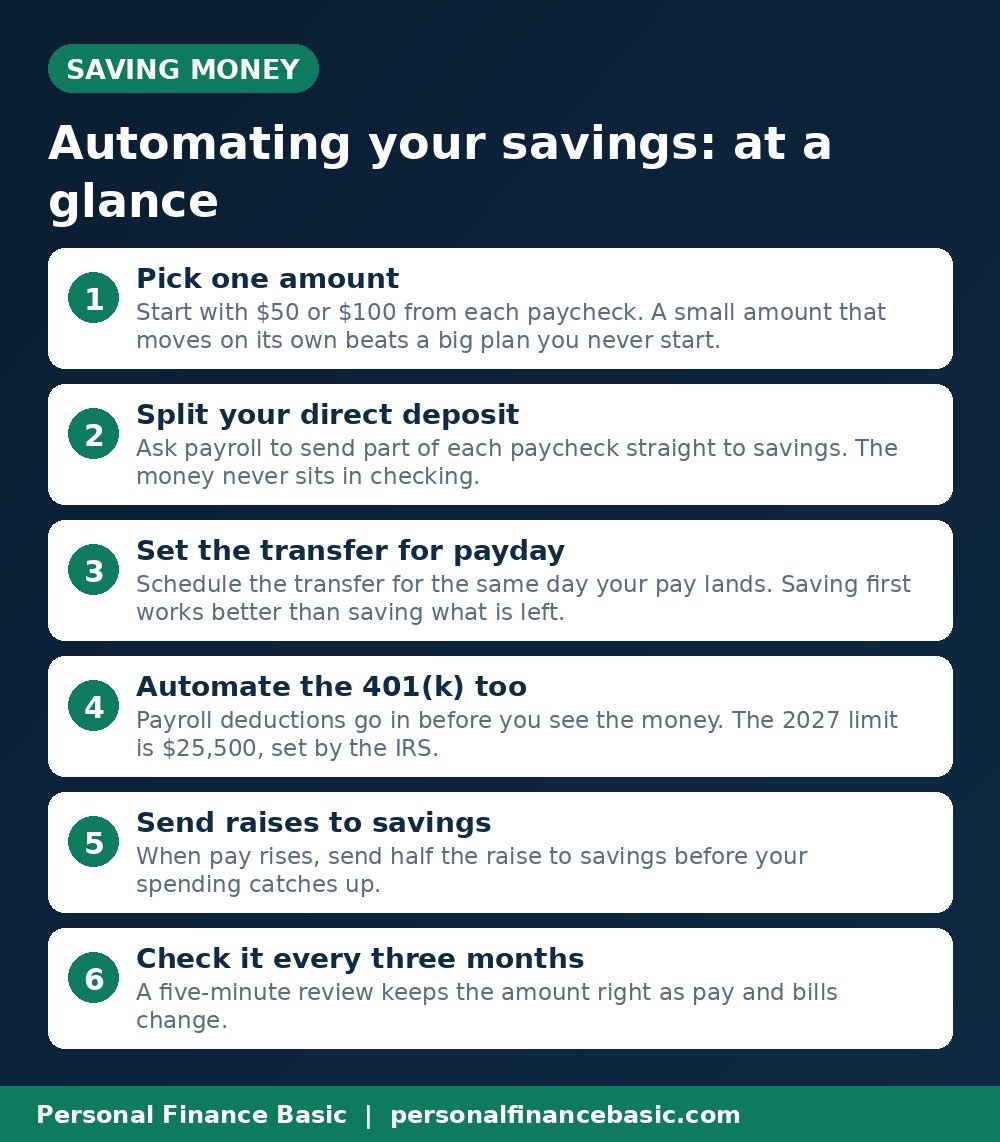
The main points from this guide, in one picture.
Frequently asked questions
How much should I automate from each paycheck?
Start with $50 to $100 per paycheck, or about 5 percent of your take-home pay. If money is tight, $25 works as a start. The right amount is one you do not notice missing. Raise it after three months.
What if my employer will not split my direct deposit?
Use a scheduled transfer from checking to savings on payday instead. It does the same job, and you set it up in your banking app in about five minutes. Set the transfer for payday itself, not a few days later.
Should I automate saving before paying off debt?
Do both, in this order: save a small emergency cushion first, about $500 to $1,000, then put extra money toward high-interest debt. A small cushion stops the next flat tire from going on a credit card.
Can I automate saving if my income changes every month?
Yes. Set a small fixed transfer that fits your lowest month, then add extra by hand in good months. Some banks also let you move a percentage of each deposit, which rises and falls with your pay.
What happens if the transfer takes too much and my account goes low?
Lower the amount rather than stopping it. Most banks let you change or pause a recurring transfer in the app. If a transfer would overdraw your account, reduce the amount until your buffer is bigger.
The bottom line: pick an amount, set it to move on payday, and check it every three months. Saving that happens on its own beats saving that depends on willpower.
This guide is general education, not financial advice. Your pay, debts, and goals change what works for you. Consider speaking with a qualified financial adviser about your own situation.
Related reading: How Much Emergency Fund Do You Need? With $ Examples and The 50/30/20 Rule With US Examples ($3,000 a Month)